Transport Cost
Transport cost data is available in two ways if there is no Cost Per Distance data for a lane. High-level transport cost data can be accessed using the Retrieve High-level Cost Data attribute, and detailed transport cost data can be requested through the Request Detailed Cost Data attribute. These options allow users to control how the model handles lanes without lane-specific cost information.
High-level Transport Cost Data
High-level transport cost data is free to use: by entering 1 in the Retrieve High-level Cost Data attribute, the model automatically applies generalized Cost Per Distance values when lane-specific data is missing. The value is selected based on the origin-destination country pair, or for US domestic lanes, the origin-destination state pair. Transport costs are defined in USD per tonne-km, where 1 tonne equals 1000 kg.
To ensure correct calculations, the necessary currency and unit conversions must be available. The Default Currency per USD Conversion value must always be specified on the Settings page; if the default currency is USD, enter 1. If the Default Base UOM is not ton, a conversion to ton (i.e. metric tonne, 1000 kg) must be defined on the UOM Conversions page for each product for which high-level transport costs are retrieved.
The Average Load Size attribute must be defined for lanes for which high-level transport costs are retrieved. The high-level values are converted to the standard distance-based transport cost structure, which uses Average Load Size to calculate the transport cost per unit of transported volume.
Detailed Transport Cost Data
For lanes where the Request Detailed Cost Data attribute is set to 1 and no lane-specific Cost Per Distance data exists, the model generates an Excel file containing the relevant lanes. Once the template is loaded without data validation issues, a “Retrieve Transport Cost” button appears in the status bar. Clicking this button automatically downloads the generated Excel file. If any geocodes are missing, the button is only displayed after geocoding has been completed.

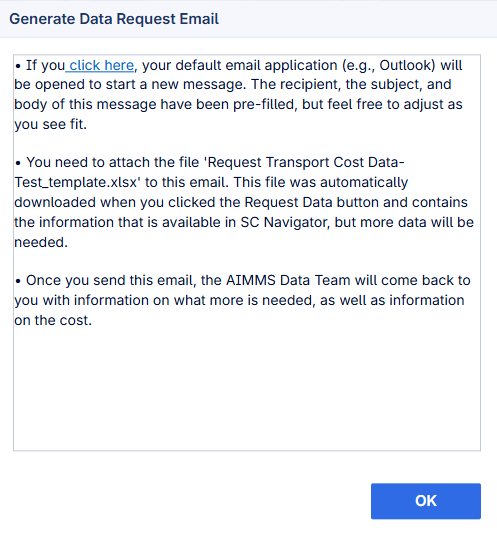
A dialog window then opens. Clicking “click here” in the dialog launches the default email client with a pre-filled draft. The user can customize the email and attach the downloaded Excel file. After sending, the user receives a response with details about the next steps and the associated pricing for the requested detailed transport cost data.
Note: It is possible to enter 1 for both attributes simultaneously. In this case, the model uses the generalized high-level data while the user can also request detailed cost data for the same lanes.