SENSAI Pro: AI Assistant
SENSAI Pro is the AI assistant in SC Navigator. You describe what you want in plain language, and it works on your supply chain model for you. It can look up input data, change it, create new warehouses, suppliers and production facilities, set Control Panel options, run the optimization, save and compare results, and run sensitivity analyses.
It works on the data you have loaded in SC Navigator and reports what it did after each request, so you can check the outcome straight away.
This page explains how to get started and how SENSAI Pro works. The following pages describe what you can do with it:
Work with Your Data - Look up and change input data, and add new entities to your network.
Optimize and Analyze - Change Control Panel settings, run the optimization, save and compare results, and run sensitivity analyses.
Tips and Limitations - Get better results from SENSAI Pro, and learn what it cannot do yet.
Getting Started
To get started with SENSAI Pro, contact your Customer Success Manager to schedule an onboarding session. It is activated for your account before the session.
Your free trial starts after the onboarding session. Your Customer Success Manager can tell you the details of the trial.
Opening SENSAI Pro
To open SENSAI Pro, click the  button at the top right of the display. The chat panel opens on the right side of the page, next to the page you are working on, so you can see your data and the conversation at the same time.
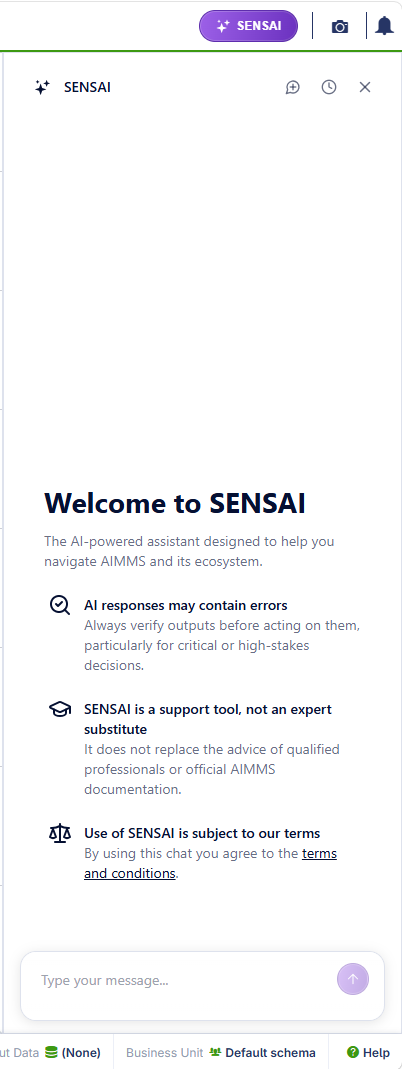
The header of the chat panel has three buttons:
- New conversation

Starts a new, empty conversation. Use this when you move on to an unrelated task, so that SENSAI Pro does not carry over context from the previous one.
- History

Shows your previous conversations, so you can continue one of them.
- Close
Closes the chat panel. Click the
button again to reopen it.
Type your request in the message box at the bottom of the panel, then press Enter or click the send button. To start a new line in your message, press Ctrl+Enter.
SENSAI Pro replies in the language you write in. Names of locations, warehouses, products and other data stay as they are in your dataset.
Important
AI responses may contain errors. Always check what SENSAI Pro reports before you act on it, particularly for critical decisions. Use of SENSAI Pro is subject to the terms and conditions shown in the chat panel.
How SENSAI Pro Works
- SENSAI Pro acts on your request
When you ask for a change, SENSAI Pro makes it straight away, without asking for confirmation first. Afterwards it reports what it changed, for which scope, and by how much. If you only want to see data, ask a question, such as “What is the maximum capacity of Krems_FG?”, rather than giving an instruction.
- SENSAI Pro does only what you ask
SENSAI Pro does not run the optimization after a data change unless you ask it to. When you ask for a change, a run and a save in one request, it carries out the steps in order. It stops and reports the reason if a step fails, for example when the model is infeasible.
There is one exception. If a question can only be answered with optimization results, such as “What is the maximum revenue if all demand is fulfilled?”, SENSAI Pro may change settings and run the model to answer it, and tells you what it changed. To get an answer from the input data only, add “from the input data, without running the model” to your question.
- Unspecified details apply to everything relevant
If you leave out the period, product or step, SENSAI Pro applies the change to all of them where the data applies. For example, “Set the maximum capacity of Lyon_LDC to 1 million” updates every period and step of Lyon_LDC. It asks you for clarification only when your request can genuinely mean two different things, for example when a place name matches two locations equally well.
- Changes are made to your loaded data
SENSAI Pro changes the input data loaded in your current session, in the same way as edits you make on the data pages. SC Navigator marks the input data as changed, so you are warned before an action, such as applying a scenario, overwrites these changes. Reloading the dataset discards them.
Review and Undo Changes
Ask “List all changes you have made so far” to see the recent changes SENSAI Pro made in your current SC Navigator session, including changes made in other conversations in that session. The list only covers the current session: when the session ends, SENSAI Pro can no longer list or undo its changes, even if you reopen an earlier conversation from the history.
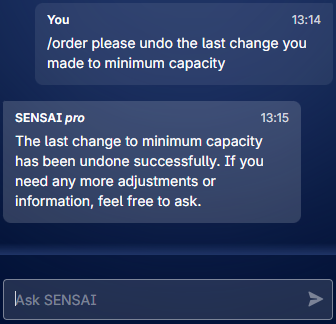
Ask “Undo the last change” to revert a change. Whether a change can be undone depends on how SENSAI Pro made it:
Data edits can be undone. This includes setting exact values, changing values by a percentage or a fixed amount, and changing Control Panel settings.
Linked Control Panel settings are not undone. Some Control Panel settings change linked settings automatically, as they do on the Control Panel page. For example, relaxing the minimum fulfillment rate also allows unfulfilled demand. Undo reverts the setting you asked to change, but not the linked setting. Check the Control Panel page after an undo, and change the linked setting back if needed.
Creating new entities and copying data cannot be undone. This includes new locations, warehouses, suppliers, production facilities, Bills of Material and transport lanes, and data copied from one entity to another. To reverse these changes, reload the dataset. Note that this also discards all other changes made since the dataset was loaded.
Model runs and saved results cannot be undone. A model run replaces the current results. To keep them, ask SENSAI Pro to save them before you run the model again.
Data Privacy and Security
SENSAI Pro processes only the data needed to carry out your request, and your data is not used to train AI models. For details on how AIMMS handles data in its AI-powered features, including data processing, retention and the controls available to you, see AI-Powered Features: Information Security Overview.
Feedback and Support
- Feedback
Your feedback is critical to the success and future direction of SENSAI Pro. It helps us verify that functionality works as expected, assess whether SENSAI Pro reduces your effort, and decide which capabilities to add next. Share your feedback with your contact at AIMMS, or email support@aimms.com.
- Support
For questions or issues, email support@aimms.com. Include the request you gave SENSAI Pro, the response or action it took, and what you expected instead.